Travelers and Attendees
Manage traveler and attendee records for travel and event bookings.
This page helps you manage traveler and attendee records.
Navigate to the Travelers and Attendees Page
Use this page to view and manage all travelers and attendees registered in the system.

Add a Traveler or Attendee
The recommended way to add and book a new traveler or attendee is through Journal. Journal is the primary workflow for registration and booking.
You can also add a traveler or attendee directly from Travel Bookings by clicking New Traveler in the lookup grid while editing a booking. This method automatically links the new record to the selected booking.
Use this direct method when you are already working in a booking and need to add one more traveler quickly.
Edit a Traveler or Attendee and View Related Information
To edit an existing traveler or attendee, click the record name in the list. This opens the detail page where you can update information and view related data.
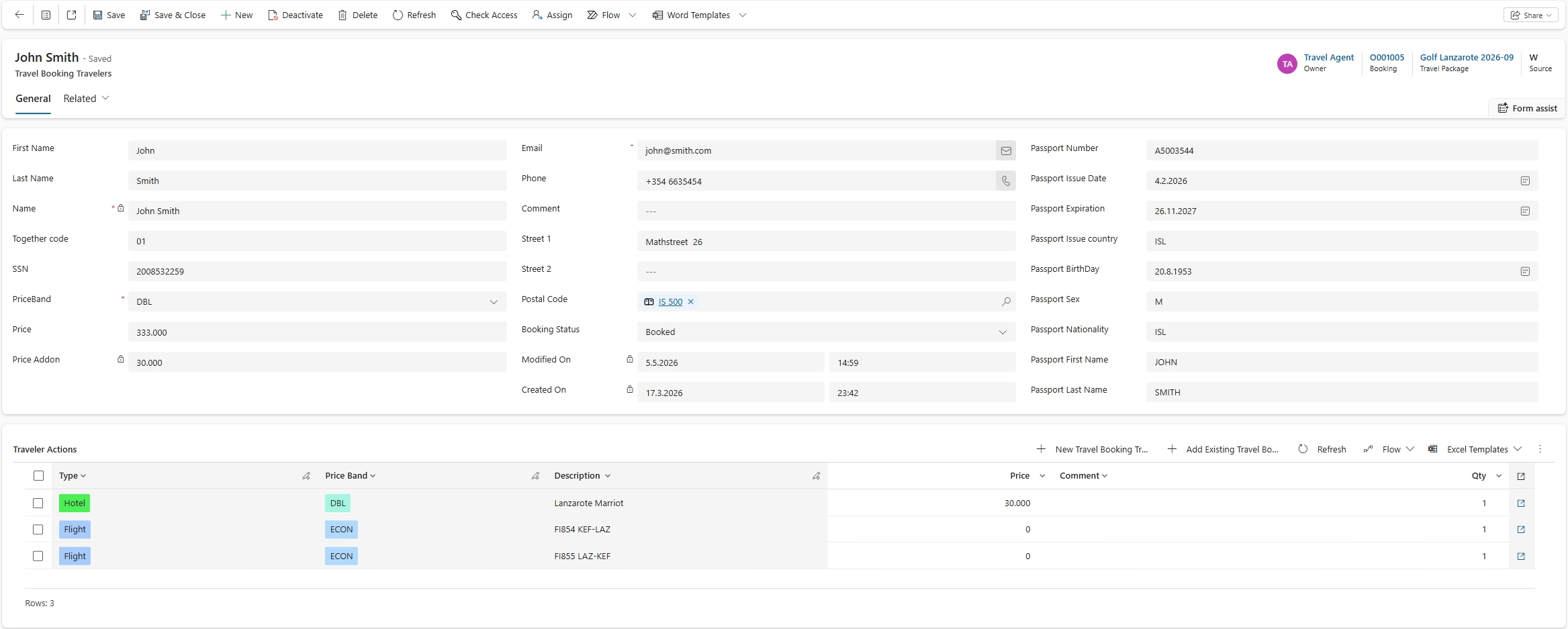
Main sections in the detail view:
- General: Main contact and personal information.
- Traveler Actions: Actions and activities associated with the traveler or attendee.
Related information includes:
- Audit History: History of changes made to the record, if enabled.
- Bookings: Bookings related to the traveler or attendee.
- Journal Line: The journal line used when the booking was posted.
Traveler and Attendee Information
When creating a new traveler or attendee, provide core identity and contact details.
Key fields include:
- First Name and Last Name: Full name.
- Contact Information: Email and phone number.
- SSN: Social security number, when required.
- Address: Address details.
- Passport Information: Passport details, when required for travel documents.