Items
Items control the visibility, display text, and booking experience for Packages.
Navigating to the Items Page
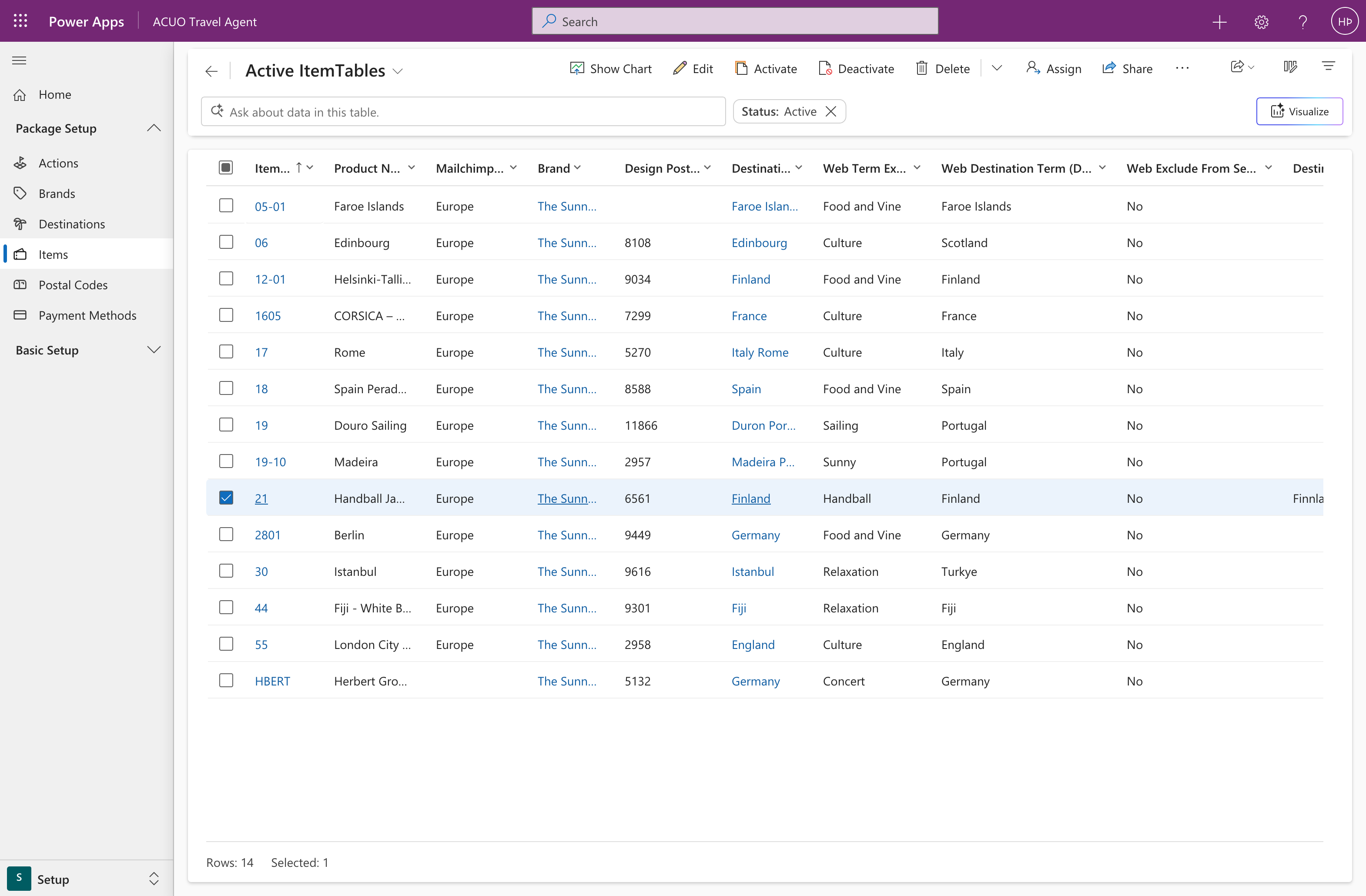
The main Items page provides an overview of all existing items. From here, you can view, manage, and create new items.
Creating a New Item
To create a new item, click on the New button in the command bar. This will open the form for a new item.
Defining the Item Details and Sections
In the New Item window, you need to fill in the details for the item. Once you have entered the required information, you can save the new item.
General
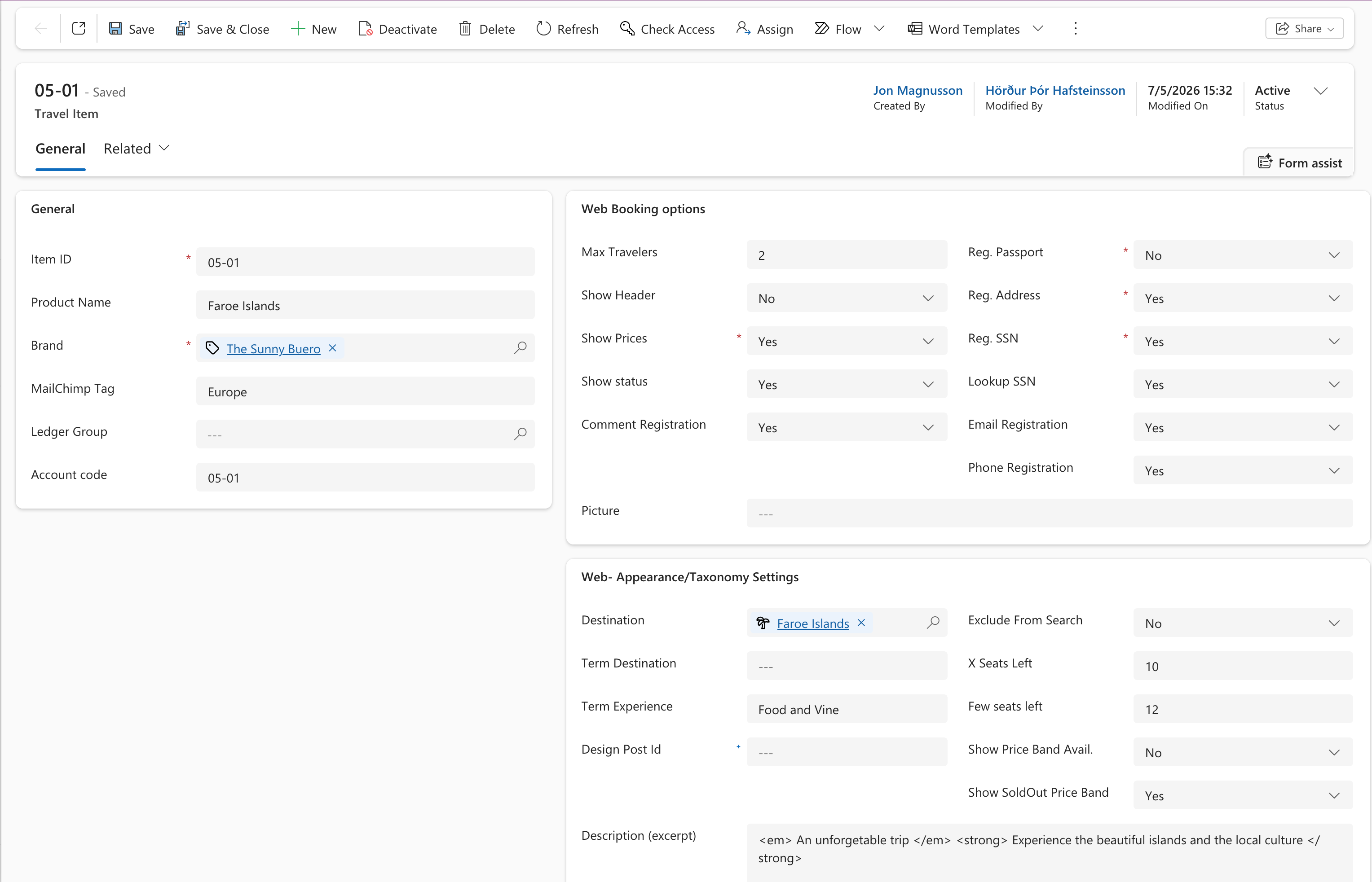
The General section contains the generic information that defines each item in the Travel Agent system. These fields establish the item's identity, financial tracking, and marketing integration.
- Item ID: Unique identifier.
- Product Name: Human-readable name that describes the item (e.g., "5-Day Iceland Adventure").
- Brand: Lookup field connecting the item to your brand, this affects how the emails are sent for example.
- MailChimp Tag: Used for email campaign segmentation and marketing automation.
- Ledger Group: Links the item to a specific ledger group for financial reporting and accounting purposes.
- Account Code: Links the item to general ledger accounts for financial reporting.
Best Practice: Maintain consistency in naming conventions across all general fields to ensure easy maintenance and clear system navigation.
Website Booking Options
This section configures the booking form behavior for the item on the website. These settings control how customers interact with the booking process and what information is collected.
- Max Travelers: Sets the maximum number of travelers allowed in a single booking.
- Show Header: Controls whether header text is displayed on the booking form.
- Show Prices: Determines if pricing information is visible on website.
- Show Status: Displays availability status ("Few seats left", "Only {x} seats left", "Sold Out") if enabled.
- Reg. Passport: Require registering passport information during booking (Passport number, Sex, Issue Date, Expiration Date, Birthday) if enabled.
- Reg. Address: Register address during booking if enabled.
- Reg. SSN: Requires Social Security Number to be registered during booking.
- Comment Registration: Allows customers to add comments during the booking process.
- Email Registration: Requires customers to provide an email address during booking.
- Phone Registration: Requires customers to provide a phone number during booking.
- Lookup SSN: Enables web service lookup for SSN for automatic population of name and address.
- Picture: Stores a URL for the picture displayed on the booking form. If empty, no picture is shown.
Website Appearance Settings
This section configures how the travel package appears on sales web pages (like WordPress) and controls display of availability information to visitors.
- Destination: Sets the destination associated with this item.
- Term Destination: Configures destination taxonomy terms for sales web page, if left empty then the value is defaulted to the one defined in Destination.
- Term Experience: Sets experience type classification for filtering in sales web page (like WordPress).
- Design Post Id: Links to specific WordPress post that will be used as a template for the item.
- Exclude from Search: If enabled, the item will not appear in search results on the sales website.
- X Seats Left: Threshold number for displaying "seats left" notification on the booking form.
- Few Seats Left: The threshold that triggers the "Few Seats Left" notification. When availability drops to this number or below, the message appears.
- Show Price Band Avail.: Displays availability information based on price bands if enabled.
- Show Sold Out Price Band: Displays the sold out status for each price band if enabled.
- Description (excerpt): Brief description that appears in gallery listings and search results on the sales website. Can be changed for individual package customization.
Related Resources
Brands
Learn how to manage your brands.
Destinations
How to set up and use destinations in Travel Agent.